AI Professional Photo Generator

This ai professional photo generator enables signed-in users to turn one portrait into a business-ready image. Upload a single JPEG, PNG, or WebP image under 20MB, then select Corporate, Studio, or Modern. The ai professional photo generator presents one portrait-oriented image for review across personal and company work profiles. You can inspect a watermarked preview first; clean download access depends on your subscription, credits, or single-photo purchase.

Generate Professional Photo

Step 1

Style

Uses 5 credits per generation

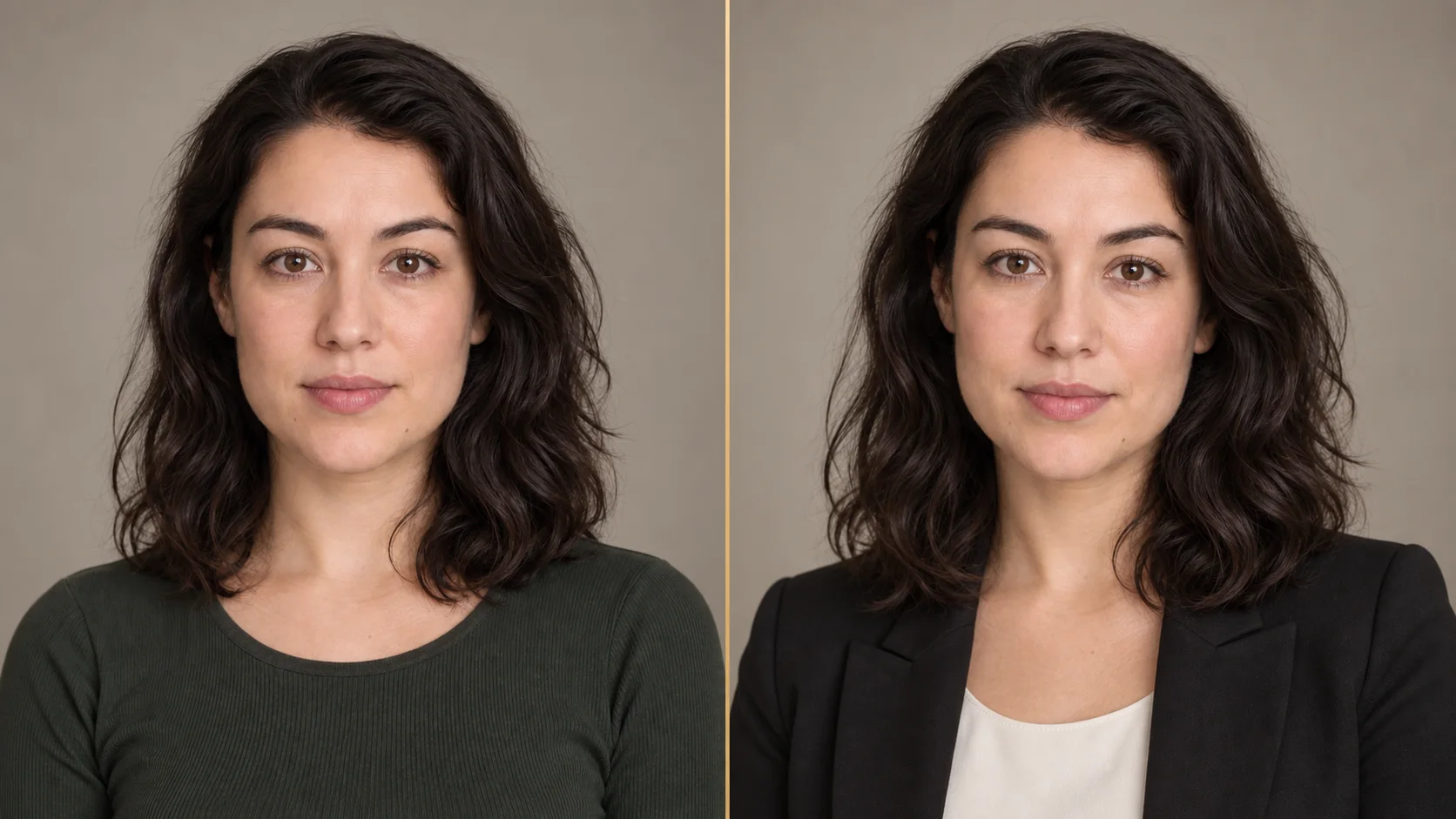
Portrait photo alongside Corporate style business headshot
Use the ai professional photo generator to select Corporate style with a business-casual wardrobe and neutral studio setting.

Create a Professional Photo From One Portrait

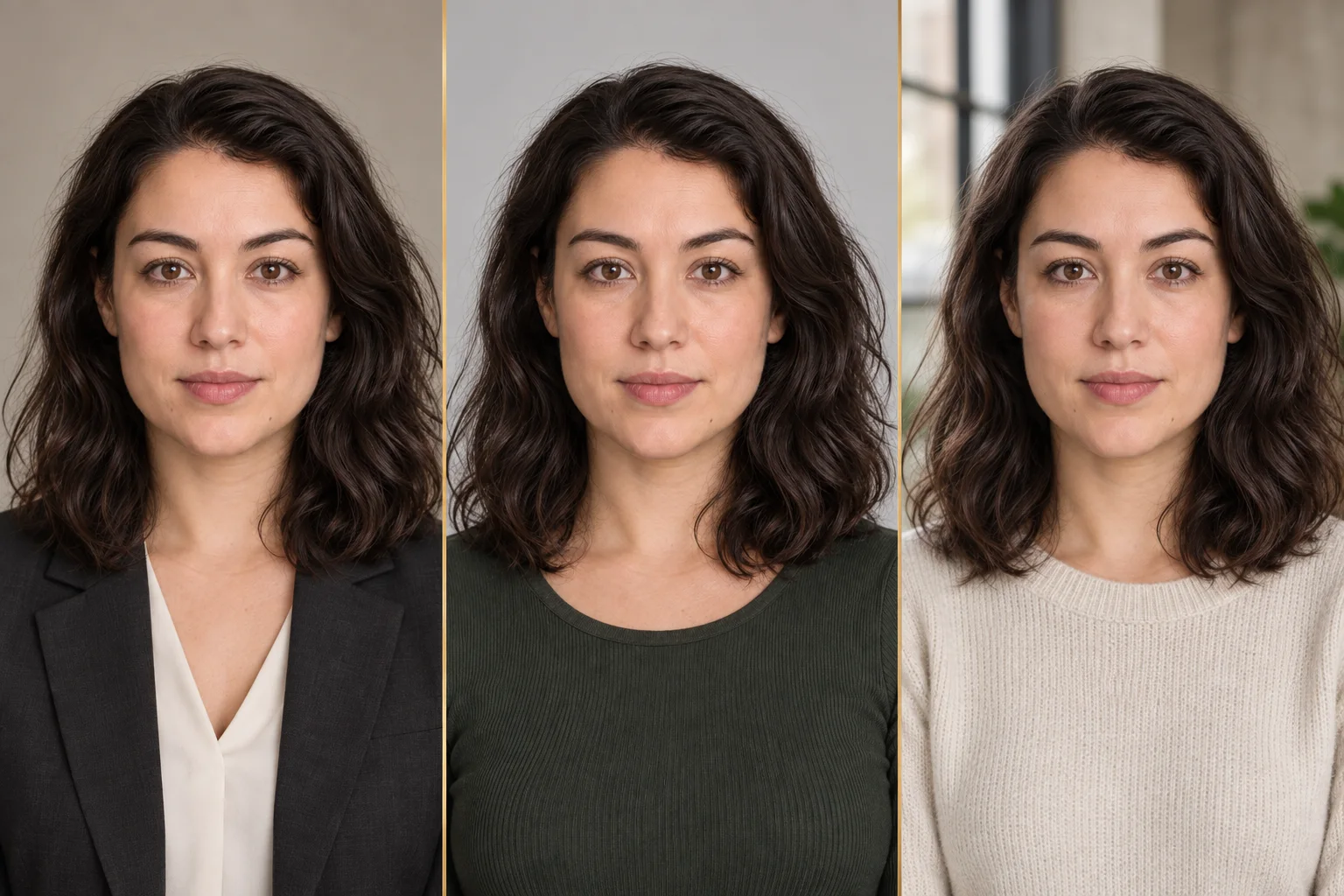
Our ai professional photo generator prepares your business portrait using three defined visual styles. Choose Corporate, Studio, or Modern for your single uploaded portrait, then review the generated preview. Corporate keeps the presentation formal, Studio stays clean and neutral, and Modern adds a contemporary setting without requiring a custom prompt.

01

Corporate

Select Corporate to place your portrait in a neutral studio setting with a business-casual wardrobe. This ai professional headshot generator provides one generated portrait per run, with clean download access based on your account. It suits company directories, employer profiles, and applications that call for a restrained presentation.
02

Studio

Studio mode pairs clean light background tones with simple portrait lighting for your uploaded file. Use this professional headshot generator to create one portrait-oriented image, then review its preview before downloading when your account has access. It is useful when you want a straightforward portrait with less environmental detail and a brighter visual treatment.

03

Modern

Modern mode frames your portrait against a subtle architectural backdrop for a contemporary aesthetic. This ai professional headshot generator offers a focused alternative to plain backdrops, with clean download access after you unlock the result. It gives a profile image more visual character while keeping the portrait suitable for professional contexts.

Comparison of Corporate, Studio, and Modern portrait styles
Three visual directions showing Corporate, Studio, and Modern styles for one uploaded portrait.

Professional Photos for Work Profiles

Each generation delivers a single portrait image for your key public accounts. Use this ai professional photo generator to prepare imagery across directories, personal landing pages, and work profiles, then unlock a clean download when needed. Review the preview against your intended layout before deciding whether to unlock the clean file for a particular use.

Professional Profiles and Personal Sites

Display your chosen style on portfolio pages and online profiles. This ai business photo generator provides one portrait-oriented image to review, with clean download access based on your account. Check the preview against your existing profile layout before downloading a clean version.

Resumes and CVs

Update curriculum vitae layouts with one neat portrait-oriented image. Our ai business photo generator creates a portrait in Corporate, Studio, or Modern style for review, then lets eligible users download the clean file. Keep the portrait aligned with the visual tone of the rest of your application materials.

Team Pages and Company Directories

Staff directories benefit from organized portrait imagery. An ai business photo generator supplies an individual portrait for each member file processed through the site, ready to review and unlock for download. This keeps the result focused on one person rather than combining multiple faces in a single generation.

How the Professional Photo Generator Works

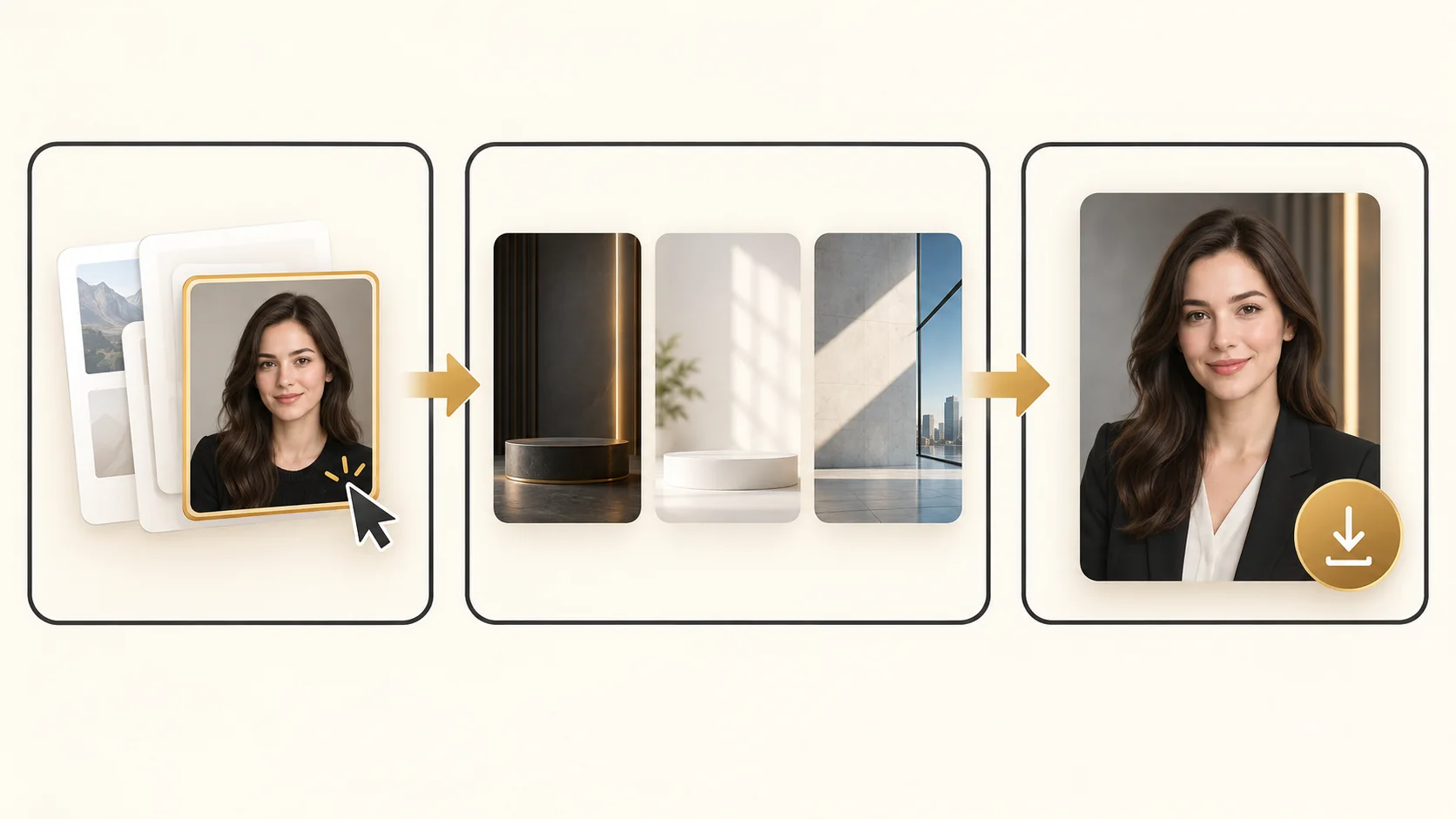
Learn how this ai professional photo generator works in three steps. Upload one portrait, choose a style, and review the generated image; clean download access depends on your account. The guided flow keeps the input, visual direction, and final review in one place.

Diagram of the three-step portrait process
Overview showing upload, style selection, and single portrait download.
  1. 01

    1. Upload Your Portrait

    Upload one portrait file in JPEG, PNG, or WebP format up to 20MB. Sign in before starting generation. The tool accepts one clear picture for your generation session, so you can prepare the input before choosing how to present it.

  2. 02

    2. Select a Professional Style

    Choose Corporate, Studio, or Modern. The system configures your selected aesthetic before the single generation request. The preset determines the visual direction while keeping the workflow simple and prompt-free.

  3. 03

    3. Review and Download

    Once generation completes, one portrait-oriented preview appears on screen. Review it, then download the clean file if your account includes a subscription, credits, or a single-photo unlock. The preview remains visible while you decide which access option fits your needs.

Upload Tips for a Better Result

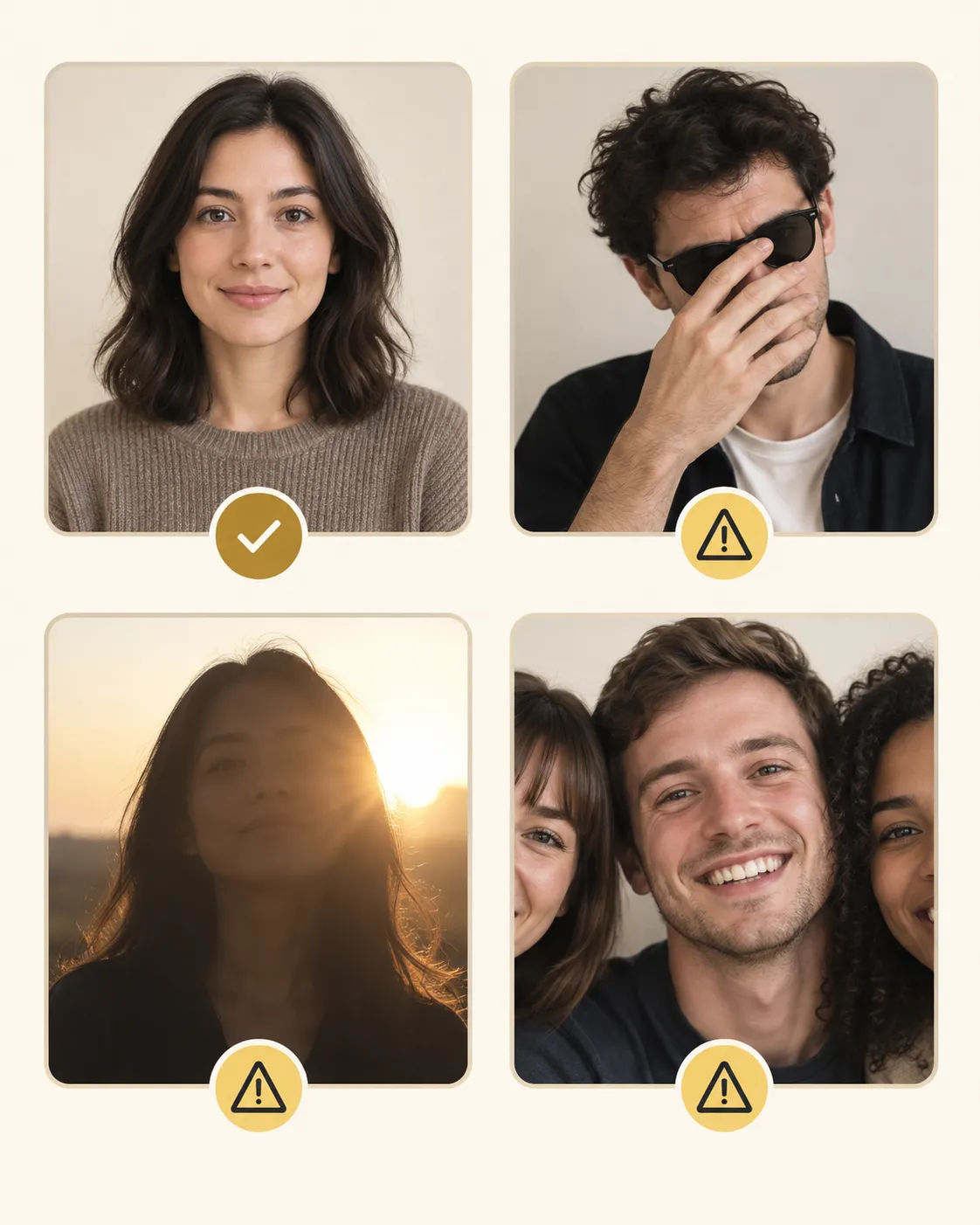
Consider these optional user choices before submitting your portrait. Selecting suitable lighting, composition, and file clarity allows you to present a clean portrait for your generation session on this website.

Balanced Frontal Lighting

Choose an image with balanced frontal illumination across your face. Even lighting helps avoid heavy shadows in your portrait submission and makes the main facial features easier to present consistently.

Centered Solo Framing

Select a solo portrait where you appear centered within the frame. An image without other people is recommended before starting your run, because the page is designed to create one individual professional portrait.

Sharp Focus and Unobstructed View

Choose a clear portrait where hats, sunglasses, or strong blur do not conceal your facial features. The tool accepts any single portrait within the 20MB file limit, while clearer source details give the selected style more usable input.

Visual guide for portrait photo upload
Guidance display showing balanced lighting, centered framing, and sharp focus options.

Professional photo generator FAQ

Find answers to common questions about account access, supported image formats, style selections, and single-image portrait generation. Review the details below before starting your portrait creation process on our site, including how watermarked previews and clean downloads work.

What file types can I upload to the tool?

You can upload one portrait in JPEG, PNG, or WebP format up to 20MB in size. You may select the file before signing in; the tool asks you to sign in when you start generation. Once your file is selected, choose one of the three available style options.

Which styles are available for portrait generation?

The tool provides three distinct styles: Corporate with business-casual attire and neutral studio surroundings, Studio with light backgrounds and simple portrait illumination, and Modern featuring subtle architectural backdrops. Select your preferred direction within the ai professional photo generator interface.

Can I enter a custom prompt for my photo?

No custom prompt entry is provided on this tool page. Instead, choose between Corporate, Studio, or Modern presets. Each generation run applies the predetermined aesthetic settings of the selected visual style to your uploaded portrait.

How do I review and download the generated image?

After generation completes, one preview appears. If you have a subscription, available purchased credits, or a single-photo unlock, you can download a clean version. Otherwise, the preview is watermarked and the download button opens purchase options. Credits can be purchased or included through an active subscription, while the single-photo option unlocks only this result.

How many images are produced from one upload?

Each completed session produces exactly one portrait-oriented image for review. The clean file is downloadable when your account has the required access; otherwise, you can view the watermarked preview and choose an unlock option. The access choice applies to the result shown on this page.

How to make a professional photo with AI on this site?

To make a professional photo with AI, sign in, upload a single JPEG, PNG, or WebP portrait under 20MB, and pick Corporate, Studio, or Modern. The ai professional photo generator creates one portrait-oriented image for review; download the clean result when your account has access.

Where can I use the downloaded portrait image?

You can use your downloaded portrait across professional profiles, personal sites, CV and resume documents, or team directories. Each generation provides one portrait-oriented image suited for online or printed work documentation, giving you a dedicated file formatted for individual career and directory presentations.

Are there pairing tools for couple portraits available?

Yes, if you need paired imagery, you can explore our related tools. These include the AI Couple Portrait Generator, AI Couple Avatar Maker, and Matching PFP Maker. Each tool focuses on partner imagery, while this page remains dedicated to individual professional portrait creation.